How to work Our website buy sell Escrow system
Step-by-Step Guide to Buying & Selling via Escrow System in socialglad.com
Step 1: Seller & Buyer Registration
Both the seller and buyer must create an account on your website.
Add bank or payment details to the account.
Complete profile verification if required.
Step 2: Listing Creation (Seller)
The seller creates a listing for the item or service they want to sell.
Listing should include:
Name & category of the item/service
Detailed description (digital ID, account, product, etc.)
Price (fixed or negotiable)
Supporting images or proofs, if available
Step 3: Buyer Places an Order
The buyer selects the desired listing.
Clicks “Buy Now” or “Order”.
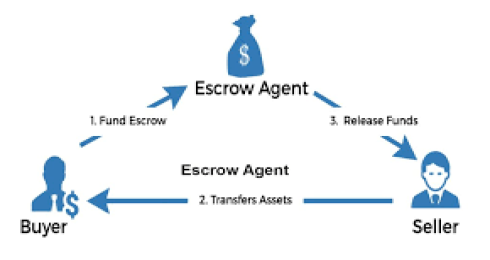
The buyer sends payment to the Escrow account, which holds the money temporarily.
The seller does not receive money directly at this stage.
Step 4: Escrow Holds the Payment
The payment remains in the website’s Escrow Wallet.
The seller is notified that the buyer has made the payment.
The seller prepares to deliver the item/service.
Step 5: Delivery / Download
The seller delivers the item or service.
For example: digital ID, login details, or other digital products.
The buyer confirms receipt or verifies the delivery.
Step 6: Payment Release
Once the buyer confirms that the item is correct, the website releases the payment from Escrow to the seller.
In case of disputes, a dispute resolution system handles the issue.
Step 7: Review & Feedback
After the transaction, both the buyer and seller can leave reviews or feedback.
This helps build trust and ratings for future transactions.
✅ Benefits of Using Escrow
Buyer’s money is safe until the product/service is delivered.
Both seller and buyer face lower risk.
Ensures transparent and trustworthy transactions.
Latest Blog

What is YouTube SEO and Why It Matters?
29 Mar 2026
How to sell my Youtube channel
24 Mar 2026